 Master
943acbc573
Master
943acbc573
Durcit la convention de nommage des projets (dérive constatée : 'Sliding
Automation', 'code_versioning'... au lieu des formes canoniques).

- trilium_api.py : projets_canoniques() lit le référentiel = valeurs du label
  projet sur les notes de type=projet (source unique, pas de constante en dur).
  Note-projet CodeVersioning créée (manquait).
- mcp_server.py : _valider_projet() branché dans les 6 tools de création
  (add_decision/history/backlog, new_conversation, create_entite, add_skill).
  Refuse un projet non canonique (suggestion si faute) ou inconnu (renvoi au
  processus de création de projet). Ne verrouille pas si référentiel illisible.
- lint_audit.py : VAL-nommage aligné sur le référentiel (attrape casse, espace
  ET snake_case ; l'ancien 'contient un espace' ratait code_versioning).
- Données : 79 notes ré-étiquetées vers les 3 formes canoniques.

Quality by design : l'erreur de nommage devient impossible à l'écriture, le
Lint n'est plus que le filet de sécurité.
134 lines
5.0 KiB
Plaintext
134 lines
5.0 KiB
Plaintext
Metadata-Version: 2.1
|
|
Name: wavedrom
|
|
Version: 2.0.3.post3
|
|
Summary: WaveDrom compatible python command line
|
|
Home-page: https://github.com/wallento/wavedrompy
|
|
Author: Aliaksei Chapyzhenka, BreizhGeek, Kazuki Yamamoto, Stefan Wallentowitz
|
|
Author-email: k4zuki@github.com, stefan@wallentowitz.de
|
|
License: UNKNOWN
|
|
Keywords: wavedrom svg
|
|
Platform: UNKNOWN
|
|
Classifier: Development Status :: 4 - Beta
|
|
Classifier: Intended Audience :: Developers
|
|
Classifier: Topic :: Software Development :: Build Tools
|
|
Classifier: License :: OSI Approved :: MIT License
|
|
Classifier: Programming Language :: Python :: 2
|
|
Classifier: Programming Language :: Python :: 2.7
|
|
Classifier: Programming Language :: Python :: 3
|
|
Classifier: Programming Language :: Python :: 3.3
|
|
Classifier: Programming Language :: Python :: 3.4
|
|
Classifier: Programming Language :: Python :: 3.5
|
|
Classifier: Programming Language :: Python :: 3.6
|
|
Classifier: Programming Language :: Python :: 3.7
|
|
Description-Content-Type: text/markdown
|
|
Provides-Extra: test
|
|
License-File: LICENSE
|
|
|
|
# WaveDromPy
|
|
|
|
This is a python module and command line fully compatible with [WaveDrom](https://wavedrom.com/), which is originally implemented in JavaScript. It is useful if you want to generate wavedrom diagrams from a python environment or simply don't want to install the _Node.js_ environment just to use WaveDrom as simple command line.
|
|
|
|
WaveDromPy is for example used in [sphinxcontrib-wavedrom](https://pypi.org/project/sphinxcontrib-wavedrom/) to render wavedrom for Sphinx documentation. While the original project renders the diagrams in JavaScript in the browser, WaveDromPy renders them to SVG files.
|
|
|
|
This tool is a direct translation of original Javascript file _WaveDrom.js_ to Python. No extra feature added. We seek to have it fully compatible.
|
|
|
|
The tool _WaveDromPy_ directly converts _WaveDrom_ compatible JSON files into SVG format.
|
|
|
|
[](https://travis-ci.org/wallento/wavedrompy)
|
|
[](https://badge.fury.io/py/wavedrom)
|
|
|
|
## Installation
|
|
|
|
It is most easy to just install wavedrom via pip/pypi:
|
|
|
|
pip install wavedrom
|
|
|
|
Alternatively you can install the latest version from this repository:
|
|
|
|
pip install git+https://github.com/wallento/wavedrompy
|
|
|
|
or from your local copy:
|
|
|
|
pip install .
|
|
|
|
## Usage
|
|
|
|
You can either use the tool from Python:
|
|
|
|
import wavedrom
|
|
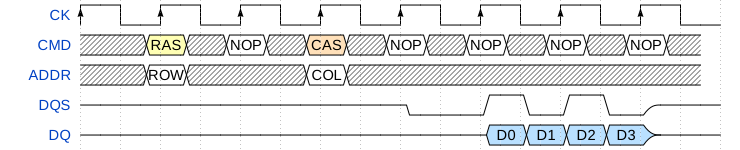
svg = wavedrom.render("""
|
|
{ "signal": [
|
|
{ "name": "CK", "wave": "P.......", "period": 2 },
|
|
{ "name": "CMD", "wave": "x.3x=x4x=x=x=x=x", "data": "RAS NOP CAS NOP NOP NOP NOP", "phase": 0.5 },
|
|
{ "name": "ADDR", "wave": "x.=x..=x........", "data": "ROW COL", "phase": 0.5 },
|
|
{ "name": "DQS", "wave": "z.......0.1010z." },
|
|
{ "name": "DQ", "wave": "z.........5555z.", "data": "D0 D1 D2 D3" }
|
|
]}""")
|
|
svg.saveas("demo1.svg")
|
|
|
|
This will render a waveform as:
|
|
|
|
|
|
|
|
You can find more examples [in the WaveDrom tutorial](https://wavedrom.com/tutorial.html).
|
|
|
|
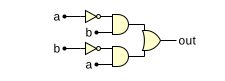
A second feature is that WaveDrom can render logic circuit diagrams:
|
|
|
|
import wavedrom
|
|
svg = wavedrom.render("""
|
|
{ "assign":[
|
|
["out",
|
|
["|",
|
|
["&", ["~", "a"], "b"],
|
|
["&", ["~", "b"], "a"]
|
|
]
|
|
]
|
|
]}""")
|
|
svg.saveas("demo2.svg")
|
|
|
|
This will render a as:
|
|
|
|
|
|
|
|
You can find more examples [in the WaveDrom tutorial2](https://wavedrom.com/tutorial2.html).
|
|
|
|
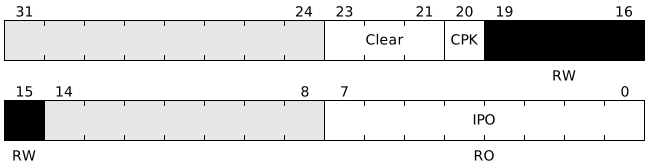
Finally, wavedrom can draw registers as bitfields:
|
|
|
|
import wavedrom
|
|
svg = wavedrom.render("""
|
|
{"reg": [
|
|
{ "name": "IPO", "bits": 8, "attr": "RO" },
|
|
{ "bits": 7 },
|
|
{ "name": "<o>B</o><b>R<i>K</i></b>", "bits": 5, "attr": "RW", "type": 4 },
|
|
{ "name": "CPK", "bits": 1 },
|
|
{ "name": "Clear", "bits": 3 },
|
|
{ "bits": 8 }
|
|
]
|
|
]}""")
|
|
svg.saveas("demo3.svg")
|
|
|
|
|
|
This will render as:
|
|
|
|
|
|
|
|
This mode is documented as part of the [bit-field](https://www.npmjs.com/package/bit-field) JavaScript package.
|
|
|
|
Alternatively, WaveDromPy can be called from the command line:
|
|
|
|
wavedrompy --input input.json --svg output.svg
|
|
|
|
## Important notice
|
|
|
|
The command line uses Python's JSON interpreter that is more restrictive (coherent with the JSOC spec), while the JavaScript json is more relaxed:
|
|
|
|
* All strings have to be written between quotes (""),
|
|
* Extra comma (,) not supported at end of lists or dictionaries
|
|
|
|
## AsciiDoctor example
|
|
|
|
An _AsciiDoctor_ example is provided to directly generate timing diagrams from _AsciiDoctor_ formatted documents.
|
|
|
|
|
|
|